initial App2App Deeplink Spec
note
initial은 App to App 호출을 위한 Deeplink 규격을 제공합니다.
Deeplink 연동 Spec
initial의 deeplink는 등록된 기관 및 증명서에 한해서 동작합니다.
아래와 같은 scheme으로 동작합니다.
initial & 모바일지갑
- Scheme : initial://reqService?{{Parameter}}
모바일지갑 전용
- Scheme : scheme://mwpService?{{Parameter}}
1. Deeplink Parameters
공통 Parameters
| Parameter | M / O | Type | Value | Description |
|---|---|---|---|---|
| process | 필수 | string | I V E O F |
I - Issue, Credential 발급 V - Verify, Credential 제출/검증 S - Sign, 전자서명 E - 행안부 전자문서 제출 O - OCR scan 문서 제출 F - 추가서류 제출 K – 코스콤 전자서명 전용 |
| ynCloud | 필수 | string | Y | Cloud Agent 기관 여부 (Y/N) |
| orgName | 필수 | string | 기관명 | 표시하기 원하는 기관명. (urlencoding 필수) |
| oUldUrl | process= 'O' or 'F'가 포함일 경우 필수 | String | 상세 정보 | OCR 촬영서류 및 기타서류를 제출하기 위한 URL (urlencoding 필수) |
| seq | 옵션 | string | 고객구분자 | 고객구분자 / 신청번호 |
| svcPublicDID | process='V' or 'I' 포함일 경우 필수 | string | did:ssw:{{did}} | 기관의 PublicDID |
| nonce | 옵션 | string | a123456789b | Issuer or verifier의 nonce |
| credDefId | process= 'I' 포함일 경우 필수 | string | cred_def_id | 증명서 ID |
| credName | ynCloud=Y 이며 process='V' or 'I' 포함일 경우 필수 | string | 기관명 | 표시하기 원하는 증명서명 (urlencoding 필수) |
| issueCredName | ynCloud=Y 이며 process='K' 일 경우 필수 | string | 기관명 | 발급 증명서 명 (urlencoding 필수) |
| verifyCredName | ynCloud=Y 이며 process='K' 일 경우 필수 | string | 기관명 | 검증 증명서 명 (urlencoding 필수) |
| invitationUrl | invitationUrl 혹은 invitation 둘중 하나 필수 | URL | URL | 등록된 invitation url (urlencoding 필수) |
| invitation | invitationUrl 혹은 invitation 둘중 하나 필수 | string | invitation json | create-invitation으로 생성된 json. /connections/create-invitation 에서 public=false 로 생성한 경우 사용 |
| ocrDocs | process='O' 포함 일 경우 필수 | string | 90000000011 | OCR문서 목록 (별도 코드표 요청) 1개이상 제출시 "_" 로 구분 |
| govDocs | process='E' 포함 일 경우 필수 | string | 90000000011 | 전자정부 문서 목록 (별도 코드표 요청) 1개이상 제출시 "_" 로 구분 |
| govWalletAddr | process='E' 포함 일 경우 필수 | String | 지갑 주소 | 제출할 곳의 전자정부 지갑 주소 |
| etcDocs | process='F' 포함 일 경우 필수 | string | 지갑 주소 | 기타 서류 (카메라 촬영에 의한 서류 – 코드표 참조) 1개이상 제출시 "_" 로 구분 |
| masking | process= 'E' or 'O' or 'F'가 포함일 경우 필수 | string | Y N |
마스킹 처리 여부 |
| ~submitUrl~ | deprecated | URL | 상세 정보 | deprecated |
| callback | 옵션 | string | URL | 제출완료 후 복귀할 deeplink URL (urlencoding 필수) |
| govIssue | process='E' 포함 일 경우 필수 | string | Y N |
"Y"일 경우 발급 후 제출 |
| eventType | 옵션 | string | { "free-issue": true } | 진행되는 이벤트 타입 (urlencoding 필수) |
모바일지갑 전용 Parameters
scheme://mwpService? 와 같이 모바일지갑 전용으로 사용되는 규격 입니다.
| Parameter | M / O | Type | Value | Description |
|---|---|---|---|---|
| verifyVC (지원 예정) |
옵션 process= 'V' 인 경우 사용 가능 검증 시 증명서 없을 경우 발급받아야 하는 VC 정보 |
string | 상세 정보 | 모바일지갑 전용(mwpService) |
| intService (지원 예정) |
옵션 | string | credential government 상세 정보 |
모바일지갑 전용(mwpService) |
- sample : 검증요청 / Cloud Agent 기관 / Public DID / 발행할 Cree_Def_ID / invitation-url
- 각 parameter value는 urlencoding 해야 함
initial://reqService?process=V&ynCloud=Y&orgName=SKT&credName=%ED%98%81%EC%8B%A0%EA%B3%B5%EC%9C%A0%EB%8C%80%ED%95%99&svcPublicDID=did:ssw:39twDfvgTg5ifaPzTQqUxQ&invitationUrl=https%3A%2F%2Fdev-console.myinitial.io%2Fivp%2Fsessions%2F1f288d76-8974-4620-9f5c-fc5f17755135%2Finvitation
Parameter 상세 설명 및 예시
process
- deeplink를 통해 실행해야 하는 actions를 정의
- ex) process=VE : 연결 완료되면 검증(Verify)를 요청하고, 완료되면 행안부 전자문서를 제출 요청
- ex) process=I : 연결 완료 후 발행 요청
- ex) process=VEO : 연결 완료 후 자격증명 검증(Verify) 요청하고, 완료되면 행안부 전자문서 및 OCR 스캔 요청
ynCloud
- ynCloud=Y : Cloud Agent 사용 기관임을 명시
orgName
- orgName=SKT : 회사명
oUldUrl
- OCR 촬영서류 및 기타서류를 제출하기 위한 URL로 연동 파트너가 직접 API를 구현해야 함.
- 참고 가이드
- example : http://127.0.0.1/initial/upload.do
svcPublicDID
해당 기관의 public DID를 did:ssw method를 포함해서 입력
- svcPublicDID=did:ssw:DrLbXFSao4Vo8gMfjxPxU1
credDefId
발급/검증을 위한 target cred_def_id를 입력
- credDefId=DrLbXFSao4Vo8gMfjxPxU1:3:CL:1617698238:81df0010-62b4-45b1-bd00-8d0ad74762fd
seq
- seq=1038555586867
govDocs
전자정부 문서 제출 목록. 1개 이상 제출 시 "_"로 구분
- govDocs=30000200076_30000100010
문서 코드표 (update 예정)
govWalletAdd
기관의 수취용 전자정부 지갑 주소
- govWalletAdd=2V3mcLB7ieZ1Y7XcdBW3rYPcvu6sfEupULzqKaN
govWalletAdd
민감정보 마스킹
- masking=Y
submitUrl (deprecated)
Cloud Agent 기관은 submitUrl parameter를 더이상 사용하지 않습니다. Cloud Agent 기관은 basic message를 통해 전달 받는다. 상세 문서는 아래 참조 - https://initial-v2-platform.readthedocs.io/initial_deeplink/#4
invitationUrl
connection에 사용하기 위한 invitation-url을 전달한다.
invitationUrl=https://issue.sktelecom.com/invitation-url
실제 Deeplink 생성시에는 URL-encoded format으로 생성해야 한다
invitationUrl=https%3A%2F%2Fissue.sktelecom.com%2Finvitation-url
invitation
/connections/create-invitation 에서 public=false 로 생성한 경우 사용한다
{
  "connection_id": "30cbd096-0fc9-4d12-b668-ad045345485e",
  "invitation": {
    "@type": "did:sov:BzCbsNYhMrjHiqZDTUASHg;spec/connections/1.0/invitation",
    "@id": "8f215dba-072b-4ccc-b908-0e95ac4ce98c",
    "recipientKeys": [
      "EjD1ieKnuetMQ8E76pXczHKZYfBbmrXrZUTSAP3nmn9F"
    ],
    "serviceEndpoint": "https://dev-console.myinitial.io/agent/endpoint",
    "imageUrl": "https://kr.object.ncloudstorage.com/dev-image-file/d41d8cd9_cdf0a7c0_1624540317",
    "label": "SKT_Issuer_Demo"
  },
  "alias": "a123456789b", //기관이 특정 사용자를 지칭하기 위해 사용하는 key 값
  "invitation_url": "https://dev-console.myinitial.io/agent/endpoint?c_i=eyJAdHlwZSI6ICJkaWQ6c292OkJ6Q2JzTlloTXJqSGlxWkRUVUFTSGc7c3BlYy9jb25uZWN0aW9ucy8xLjAvaW52aXRhdGlvbiIsICJAaWQiOiAiOGYyMTVkYmEtMDcyYi00Y2NjLWI5MDgtMGU5NWFjNGNlOThjIiwgInJlY2lwaWVudEtleXMiOiBbIkVqRDFpZUtudWV0TVE4RTc2cFhjekhLWllmQmJtclhyWlVUU0FQM25tbjlGIl0sICJzZXJ2aWNlRW5kcG9pbnQiOiAiaHR0cHM6Ly9kZXYtY29uc29sZS5teWluaXRpYWwuaW8vYWdlbnQvZW5kcG9pbnQiLCAiaW1hZ2VVcmwiOiAiaHR0cHM6Ly9rci5vYmplY3QubmNsb3Vkc3RvcmFnZS5jb20vZGV2LWltYWdlLWZpbGUvZDQxZDhjZDlfY2RmMGE3YzBfMTYyNDU0MDMxNyIsICJsYWJlbCI6ICJTS1RfSXNzdWVyX0RlbW8ifQ=="
}
위 response는 public=false 생성한 Sample이고, 위 invitation-url key의 value 값인 https://dev-console.myini......... 부분을 아래 invitation parameter를 통해서 전달한다.
invitation=https%3A%2F%2Fdev-console.myinitial.io%2Fagent%2Fendpoint%3Fc_i%3DeyJAdHlwZSI6ICJkaWQ6c292OkJ6Q2JzTlloTXJqSGlxWkRUVUFTSGc7c3BlYy9jb25uZWN0aW9ucy8xLjAvaW52aXRhdGlvbiIsICJAaWQiOiAiOGYyMTVkYmEtMDcyYi00Y2NjLWI5MDgtMGU5NWFjNGNlOThjIiwgInJlY2lwaWVudEtleXMiOiBbIkVqRDFpZUtudWV0TVE4RTc2cFhjekhLWllmQmJtclhyWlVUU0FQM25tbjlGIl0sICJzZXJ2aWNlRW5kcG9pbnQiOiAiaHR0cHM6Ly9kZXYtY29uc29sZS5teWluaXRpYWwuaW8vYWdlbnQvZW5kcG9pbnQiLCAiaW1hZ2VVcmwiOiAiaHR0cHM6Ly9rci5vYmplY3QubmNsb3Vkc3RvcmFnZS5jb20vZGV2LWltYWdlLWZpbGUvZDQxZDhjZDlfY2RmMGE3YzBfMTYyNDU0MDMxNyIsICJsYWJlbCI6ICJTS1RfSXNzdWVyX0RlbW8ifQ%3D%3D
callback
발행/검증 완료 후 복귀한 url 주소이다.(URL encoding 필요)
- callback=initial://mainPage
reservedCallback
발행/검증 실패등으로 callback이 불가능한 경우 사용 하는 주소.(URL encoding 필요)
- callback=initial://mainPage
eventType
특별한 event를 처리하기 위한 custom 규격. 규격은 사전 협의 필요 함.
verifyVC
증명서 검증 시 사용자가 해당 증명서를 보유하고 있지않으면, 자동으로 발급을 안내하기 위한 값
- 특정 증명서(VC) 경우 credDefId를 요청
- 특정 증명서(VC) 아닌 경우 schemaId를 요청
intService
모바일지갑 서비스를 이동하기 위한 parameter. 현재 credential과 government 지원
2. 이미지 전송
OCR 인식 정보 및 촬영 된 이미지 전송은 multipart 형식으로 파일을 전송합니다.
현재 파일의 용량은 최대 10MB로 제한합니다. 검증 서버 성능에 따라서 최대 용량은 더 낮아 질 수 있습니다.
암호화(클라이언트)
- AES Symmetric Encryption 사용. 암호화 Key는 Holder의 Pairwise DID를 사용. Encrypted Data와 함께 기관의 Pairwise DID를 제공함.
복호화(서버)
- AES Library 함수를 이용 복호화. 복호화 Key는 Cloud Agent의 API를 통해서 확인.
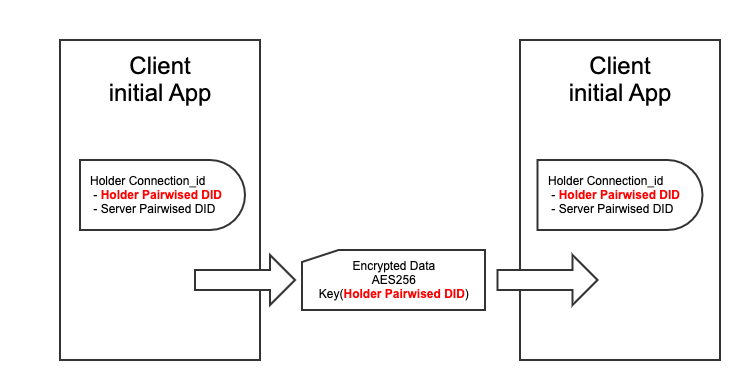
암호화/복호화 Sample Code
원본 문서
Key & IV
암복호화 JAVA Sample 코드package com.skt.ssi.demo.server.ssi.controller;
import org.junit.Test;
import javax.crypto.Cipher;
import javax.crypto.SecretKey;
import javax.crypto.spec.GCMParameterSpec;
import javax.crypto.spec.SecretKeySpec;
import java.math.BigInteger;
import java.util.Base64;
public class DocumentControllerTestNew {
public static final int AES_KEY_SIZE = 256;
public static final int GCM_IV_LENGTH = 12;
public static final int GCM_TAG_LENGTH = 16;
@Test
public void sampleTest2() throws Exception {
String origianlText = "{\"docId\":\"30000100001\",\"ocrInfo\":null,\"reqDocId\":\"30000100001\",\"seq\":\"kordi_00001\"}";
String didKeyString = "did:ssw:BhCCHbK4kMSCoetowegawq"; //기관에서 획득한 복호화 Key(their did)
String originalIv = "44d4a562a656b42a1ec24abb"; //AES Encryption에서 사용한 원본 GCM IV 12Byte
// ** AES Encoding Example **
// 키 역할을 하는 did가 32보다 짧아서 32로 만들어주고 키 생성
SecretKey originalKey = new SecretKeySpec(createKey(didKeyString), 0, 32, "AES");
//hex string인 IV 벡터를 byte array 로 변환
byte [] byteArrayIv = hexStringToByteArray(originalIv);
//암호화하려는 문자열을 base64 encoding
byte [] encodedHello = Base64.getEncoder().encode(origianlText.getBytes());
//암호화
byte[] cipherText = encrypt(encodedHello, originalKey, byteArrayIv);
//암호화된 결과를 hex string으로 변환
String hexedEncryptedEncoded = bytesToHexString(cipherText);
System.out.println("기관에게 실제 전달되는 encData : " + hexedEncryptedEncoded);
//Base64 encoding한 iv를 기관에게 전달
String encodedIv = Base64.getEncoder().encodeToString(byteArrayIv);
System.out.println("기관에게 실제 전달되는 base64 encoded iv : " + encodedIv);
//전달받은 (암호화된)hex 문자열을 byte로 변환
byte [] cipherBytes = hexStringToByteArray(hexedEncryptedEncoded);
//복호화
String plainText = decrypt(cipherBytes, originalKey, byteArrayIv);
//성공
//System.out.println("plainText : " + plainText);
// ** AES Decoding Example **
// 전달 받은 encData 샘플 문자열을 복호화 시도
String hexString = hexedEncryptedEncoded;
System.out.println("Received encData :" + hexString);
// 전달받은 (암호화된)hex 문자열을 byte로 변환
byte [] secretByte = hexStringToByteArray(hexString);
//System.out.println("encData base64 decoding :" + bytesToHexString(secretByte));
// 전달 받은 iv(Base64)를 Hex String 으로 변환
String iv = encodedIv;
System.out.println("Received iv " + iv);
byte[] decoded = Base64.getDecoder().decode(iv);
String decodedIv = String.format("%x", new BigInteger(1, decoded));
System.out.println("Received iv hex 변환" + decodedIv);
//복호화 후 base64 decode
String decryptedText = decrypt(secretByte, originalKey, decoded);
byte [] decodedDecrypted = Base64.getDecoder().decode(decryptedText);
//성공
System.out.println("복호화 최종 결과 :" + new String(decodedDecrypted));
}
byte[] encrypt(byte[] plaintext, SecretKey key, byte[] IV) throws Exception {
// Get Cipher Instance
Cipher cipher = Cipher.getInstance("AES/GCM/NoPadding");
// Create SecretKeySpec
SecretKeySpec keySpec = new SecretKeySpec(key.getEncoded(), "AES");
// Create GCMParameterSpec
GCMParameterSpec gcmParameterSpec = new GCMParameterSpec(GCM_TAG_LENGTH * 8, IV);
// Initialize Cipher for ENCRYPT_MODE
cipher.init(Cipher.ENCRYPT_MODE, keySpec, gcmParameterSpec);
// Perform Encryption
byte[] cipherText = cipher.doFinal(plaintext);
return cipherText;
}
String decrypt(byte[] cipherText, SecretKey key, byte[] IV) throws Exception
{
// Get Cipher Instance
Cipher cipher = Cipher.getInstance("AES/GCM/NoPadding");
// Create SecretKeySpec
SecretKeySpec keySpec = new SecretKeySpec(key.getEncoded(), "AES");
// Create GCMParameterSpec
GCMParameterSpec gcmParameterSpec = new GCMParameterSpec(GCM_TAG_LENGTH * 8, IV);
// Initialize Cipher for DECRYPT_MODE
cipher.init(Cipher.DECRYPT_MODE, keySpec, gcmParameterSpec);
// Perform Decryption
byte[] decryptedText = cipher.doFinal(cipherText);
return new String(decryptedText);
}
public String bytesToHexString(byte[] bytes) {
if (bytes != null && bytes.length != 0) {
StringBuilder builder = new StringBuilder();
byte[] var2 = bytes;
int var3 = bytes.length;
for (int var4 = 0; var4 < var3; ++var4) {
byte b = var2[var4];
builder.append(String.format("%02x", b));
}
return builder.toString();
} else {
return null;
}
}
public String convertHexStringToString(String hex) {
if (hex != null && hex.length() != 0) {
StringBuilder output = new StringBuilder();
for (int i = 0; i < hex.length(); i += 2) {
String str = hex.substring(i, i + 2);
output.append((char) Integer.parseInt(str, 16));
}
return output.toString();
} else {
return hex;
}
}
public static byte[] createKey(String did) {
byte[] encodedDid = did.getBytes();
byte[] key32Byte = new byte[32];
if (encodedDid.length < 32) {
System.arraycopy(encodedDid, 0, key32Byte,0, encodedDid.length);
} else if (encodedDid.length > 32) {
System.arraycopy(encodedDid, 0, key32Byte,0, key32Byte.length);
} else {
key32Byte = encodedDid;
}
return key32Byte;
}
public byte[] hexStringToByteArray(String s) {
int len = s.length();
byte[] data = new byte[len / 2];
for (int i = 0; i < len; i += 2) {
data[i / 2] = (byte) ((Character.digit(s.charAt(i), 16) << 4)
+ Character.digit(s.charAt(i+1), 16));
}
return data;
}
}
Request (multipart)
POST { oUldUrl }
Content-Type: multipart/form-data; boundary=documents
-- documents
Content-Disposition: form-data; name="docinfo"
{
    "rcvPairwiseDid": "didString",
    "encType": "AES256/GCM",
    "iv" : initial vector를 Base64인코딩한 문자열
    "encData" : "<암호화 대상 Object>를 String 으로 변환 후 Base64 인코딩 후 암호화 적용된 byte[] 를 Hex String으로 변환"
}
-- documents
Content-Disposition:form-data; name="file" filename={fileName} Content-Type: image/jpeg
{{ 이미지의 byte[] 에 암호화 적용된 byte[] }}
-- documents --
Document Info
Body Parameter
| Field name | Value | Description |
|---|---|---|
| rcvPairwiseDid | String | 기관의 Pairwise DID. 암호화 Key를 찾기 위해 사용. Ex) did:ssw:9RKZ1Vngjy7iXYWDyQU1mV |
| iv | String | "iv" : initial vector를 Base64인코딩한 문자열 |
| encType | String | 암호화 Type. 기본 AES256/GCM |
| encData | String | 하기의 <암호화 대상 Object>를 String 으로 변환 후 Base64 인코딩 후 암호화 적용된 byte[] 를 Hex String으로 변환 (Verify, Issue와 동일 로직) |
암호화 대상 Object
| Field name | Value | Description |
|---|---|---|
| seq | String | 고객구분자 or 신청서번호 |
| reqDocId | String | 이니셜 앱 요청 문서코드 |
| docId | String | 이니셜 앱 전송 코드 (코드표 참조) |
| ocrInfo | String | OCR 인식 정보 (OCR 전달 파라메터 참조) 인식된 OCR 이미지의 정보가 없을 경우 (단순 마스킹) null |
암호화 대상 Object Sample
{
    "seq": "1038555586867",
    "reqDocId": "10000000001",
    "docId": "90000000011",
    "ocrInfo": {
        "name": "홍길동",
        "idNo": "111111-1",
        "issueDate": "20201117",
        "authority": "서울특별시 중구청장"
    }
}
{fileName} 파일명 : 명명 규칙
fileName = seq + "" + reqDocId + "" + docId + 확장자
3. 기관 복호화 Key 획득 방법
기관은 Holder(사용자)가 보내온 암호화 data를 decryption 하기 위해 아래 API를 사용하여 key를 획득합니다.
Cloud Agent pairwise DID 조회 API
Sample Request
- parameter my_did에는 전달 받은 rcvPairwiseDid에서
did:ssw를 제외하고 입력
curl --location --request GET 'https://dev-console.myinitial.io/agent/api/connections?my_did=QgbxVtztGEcUrGbx5aEpHZ&state=active' \
--header 'Authorization: Bearer 2ca4dd8a-xxx-421c-bf2b-c5fb0286f2cc'
Sample Response
아래 응답의 their_did 가 복호화 key 이다
{
    "results": [
        {
            "created_at": "2021-05-13 01:28:01.013419Z",
            "rfc23_state": "completed",
            "accept": "auto",
            "state": "active",
            "their_label": "agency",
            "connection_id": "72d709d7-1a8c-4f26-a32c-b700b937e25b",
            "updated_at": "2021-05-13 01:28:05.039245Z",
            "their_role": "inviter",
            "routing_state": "none",
            "their_did": "D7rV3GxtbXuGgzKqUCbAk9", // 복호화 Key
            "invitation_mode": "once",
            "my_did": "QgbxVtztGEcUrGbx5aEpHZ",
            "invitation_key": "81Ebj8szfy9mKbhRtNVypb7NJ2YmTDN7cdm8Xg8wLW7P"
        }
    ]
}
- did는 22byte로 32byte를 만들기 위해 뒤에 0으로 padding 합니다.
- 암복호화 샘플코드 참조
4.문서 제출 완료
사용자가 문서제출을 완료 했을 때 호출합니다. (VC기반 Issue/Verify만 전달할 경우에는 호출 하지 않습니다.)
결과 전송 (사용자 → 연동기관)
문서 제출 완료 결과는 별도의 API를 호출하지 않고 Cloud Agent의 Message 전송 기능을 사용하여 전달 됩니다.
Sample
{
  "type":"initial_summit_doc",
  "content":
    {
        "seq":"1038555586867",
        "govDocs":{
            "bundleId":"999388811455",
            "reqDocId":[
                "10000000001"
            ],
            "pinCode":"099998",
            "walletAddr":"1DF34115DA312141",
            "masking":"Y",
            "verify":"Y"
        },
        "ocrDocs":[
            {
                "seq":"1038555586867",
                "reqDocId":"10000000001",
                "docId":"90000000011",
                "fileName":"1038555586867_10000000001_189057378234.tiff",
                "masking":"Y",
                "verify":"Y",
                "ocrInfo":{
                    "name":"홍길동",
                    "idNo":"111111-1",
                    "issueDate":"20201117",
                    "authority":"서울특별시 중구청장"
                }
            },
            {
                "seq":"1038555586867",
                "reqDocId":"10000000001",
                "docId":"90000000022",
                "fileName":"1038555586867_10000000001_189057378235.tiff",
                "masking":"Y",
                "verify":"Y",
                "ocrInfo":{
                    "name":"홍길동",
                    "idNo":"111111-1",
                    "issueDate":"20201117",
                    "authority":"서울특별시 중구청장"
                }
            }
        ],
        "etcDocs":[
            {
                "seq":"1038555586867",
                "reqDocId":"10000000001",
                "masking":"N",
                "verify":"Y",
                "fileName":"1038555586867_10000000001_189057378245.jpeg",
                "docId":"90000000011"
            },
            {
                "seq":"1038555586867",
                "reqDocId":"10000000001",
                "docId":"90000000012",
                "masking":"N",
                "verify":"Y",
                "fileName":"1038555586867_10000000001_189057378255.jpeg",
            }
        ]

    }
}
Client에서 위의 결과값을 전달하면 기관은 아래와 같은 Event를 Webhook controller를 통해서 받게 됩니다. 아래 content의 string을 decoding 하면 됩니다.
{

   "connection_id":"9ac517e7-4381-44ba-8890-d2feacb484df",

   "message_id":"64635b43-cc6b-4dc0-a8ce-40cad4c5cd27",

   "content":"{\"type\":\"initial_summit_doc\",\"content\":{\"seq\":\"1038555586867\",\"govDocs\":{\"bundleId\":\"999388811455\",\"reqDocId\":[10000000001],\"pinCode\":\"099998\",\"walletAddr\":\"1DF34115DA312141\",\"masking\":\"Y\",\"verify\":\"Y\"},\"ocrDocs\":[{\"seq\":\"1038555586867\",\"reqDocId\":\"10000000001\",\"docId\":\"90000000011\",\"fileName\":\"1038555586867_10000000001_189057378234.tiff\",\"masking\":\"Y\",\"verify\":\"Y\",\"ocrInfo\":{\"name\":\"\ud64d\uae38\ub3d9\",\"idNo\":\"111111-1\",\"issueDate\":\"20201117\",\"authority\":\"\uc11c\uc6b8\ud2b9\ubcc4\uc2dc \uc911\uad6c\uccad\uc7a5\"}},{\"seq\":\"1038555586867\",\"reqDocId\":\"10000000001\",\"docId\":\"90000000022\",\"fileName\":\"1038555586867_10000000001_189057378235.tiff\",\"masking\":\"Y\",\"verify\":\"Y\",\"ocrInfo\":{\"name\":\"\ud64d\uae38\ub3d9\",\"idNo\":\"111111-1\",\"issueDate\":\"20201117\",\"authority\":\"\uc11c\uc6b8\ud2b9\ubcc4\uc2dc \uc911\uad6c\uccad\uc7a5\"}}],\"etcDocs\":[{\"seq\":\"1038555586867\",\"reqDocId\":\"10000000001\",\"masking\":\"N\",\"verify\":\"Y\",\"fileName\":\"1038555586867_10000000001_189057378245.jpeg\",\"docId\":\"90000000011\"},{\"seq\":\"1038555586867\",\"reqDocId\":\"10000000001\",\"docId\":\"90000000012\",\"masking\":\"N\",\"verify\":\"Y\",\"fileName\":\"1038555586867_10000000001_189057378255.jpeg\"}]}}",

   "state":"received",

   "sent_time":"2021-11-05 02:09:02.602966Z"

}
5.문서 수취 완료 응답
연동기관 → 이니셜/모바일지갑
연동기관은 4번의 message를 받고, 즉시 사용자에게 message를 보내야 최종 종료 된다.
성공했을 경우 예시 (message code : 0000)
// "button":["확인"] 고정됨
{
  "type":"initial_message_popup",
  "content":{
    "message_code":"0000",
    "message_main":"서류 제출이 완료되었습니다.",
    "message_sub":""
  }
}
실패하고 재시도가 필요한 경우 예시 (message code : 0001)
// "button":["재시도","종료"] 고정됨
{
  "type":"initial_message_popup",
  "content":{
    "message_code":"0001",
    "message_main":"구비서류 제출 실패",
    "message_sub":"제출이 실패하였습니다. 다시 시도해 주세요"
  }
}
실패하고 재시도가 필요없는 경우 예시 (message code : 0002)
// "button":["종료"] 고정됨
{
  "type":"initial_message_popup",
  "content":{
    "message_code":"0002",
    "message_main":"구비서류 제출 실패",
    "message_sub":"명의자와 제출자 성명 불일치",
  }
}
6. 문서코드
별도문서로 제공
7. 신분증 OCR Parameter
별도문서로 제공
8. 연동 오류코드 목록
| Flag(결과코드) | Message(결과 Message) |
|---|---|
| 0000 | 성공 |
| 0001 | 실패 |
| 1001 | 파라미터 값이 없습니다. |
| 1002 | 최소값 미만입니다. |
| 1003 | 최대값 초과입니다. |
| 1004 | 패턴이 일치하지 않습니다. |
| 1005 | 타입값이 트립니다. |
| 1006 | 숫자타입이 아닙니다. |
| 1007 | 이메일이 유효하지 않습니다. |
| 2001 | 크레덴셜 DEF ID가 유효하지 않습니다. |
| 2002 | 크레덴셜 어트리뷰트 조회 오류 |
| 2003 | DID SIGN이 유효하지 않습니다. |
| 2004 | DID 복호화 오류 |
| 3001 | 필수약관에 동의하지 않았습니다. |
| 3002 | 잘못된 약관정보입니다. |
| 7004 | 만료된 access token입니다. |
| 7005 | access token을 확인바랍니다. |
| 9993 | 요청한 정보를 찾을수 없습니다. |
| 9994 | 허용하지 않은 요청입니다. |
| 9995 | 잘못된 요청입니다. |
| 9996 | 허용되지 않는 HTTP 메소드 방식입니다. |
| 9997 | 잘못된 URL로 요청되었습니다. |
| 9998 | DB에러 |
| 9999 | 서버에러 |