Message
Basic Message 소개
기관(Issuer/Verifier)와 사용자(Holder/Prover)의 SMS 문자와 메신저와 같은 Basic Message 송/수신 예제.
note
API 사용을 위해서는 Access Token이 필요함
- Access Token Example
**STEP 1. Basic Message 보내기 **
- 발급 기관은 사용자로 부터 추가 정보 입력이 필요하거나 사용자가 선택이 필요한 리스트 내용이 있을 경우 Message 보내기를 통해 요청할 수 있고, initial app은 해당 web-view 화면을 출력 한다
- initial App또한 특정 결과를 message 기능을 통해 기관 Webhook 으로 전달 한다
Method and Resource
POST /connections/{conn_id}/send-message message 전송.
-
Swagger Document
Parameters
-
Query Parameters
KEY Value Required Description
-
Path Variables
KEY Value Required Description conn_id O connection id.
e.g. 3fa85f64-5717-4562-b3fc-2c963f66afa6 -
Body
Parameter content type
application/json
important
중요!! {"contents": "{{본문}}"} 형식에서 {{본문}}의 json 규격은 STEP 2의 initial 표준 가이드를 따라야 한다.
Json Body의 String 변환 Sample
{
  // "content":"String" 의 형식을 지켜야 한다.
  "content":" {\"type\" : \"initial_web_view\" , \"content\" : { \"web_view_url\":\"https://www.sktelecom.com/test.php?their_did=UtArAzrfSaTF77mNJVcCrA\" }}"
}
Request Example
- Curl
curl --location --request POST 'https://dev-console.myinitial.io/agent/api/connections/b62bfc68-8762-4e9d-af4a-221502508944/send-message' \
--header 'Content-Type: application/json' \
--header 'Authorization: Bearer 2ca4dd8a-xxxx-xxxx-xxxx-c5fb0286f2cc' \
--data-raw '{"content":" {\"type\" : \"initial_web_view\" , \"content\" : { \"web_view_url\":\"https://www.sktelecom.com/test.php?their_did=UtArAzrfSaTF77mNJVcCrA\" }}"}'
important
중요!! {{본문}}이 json일 경우 본문내 "(Double quotation marks)는 \"(Backslash)를 포함 string으로 변환하여 Request를 보내야 합니다. 위 Request Sample을 꼭 참조해야 합니다.
Response example
- Response body
Webhook example
- topic :
basicmessages - state :
received
STEP 2. Content(본문) Spec
initial은 basicmessage를 이용하여 initial app과 다양한 통신을 할 수 있다.
그중 이미 정의된 규격(Protocol)이 있다.
STEP1에서 설명한 {{본문 or String}}에 다음의 규격을 사용하면 App에서 미리 정의한 서비스를 이용할 수 있다
important
아래는 {"contents": "{{본문}}"}의 {{본문}}에 해당하는 규격입니다. 실제 API 개발시에는 "content" key를 포함해야 합니다.
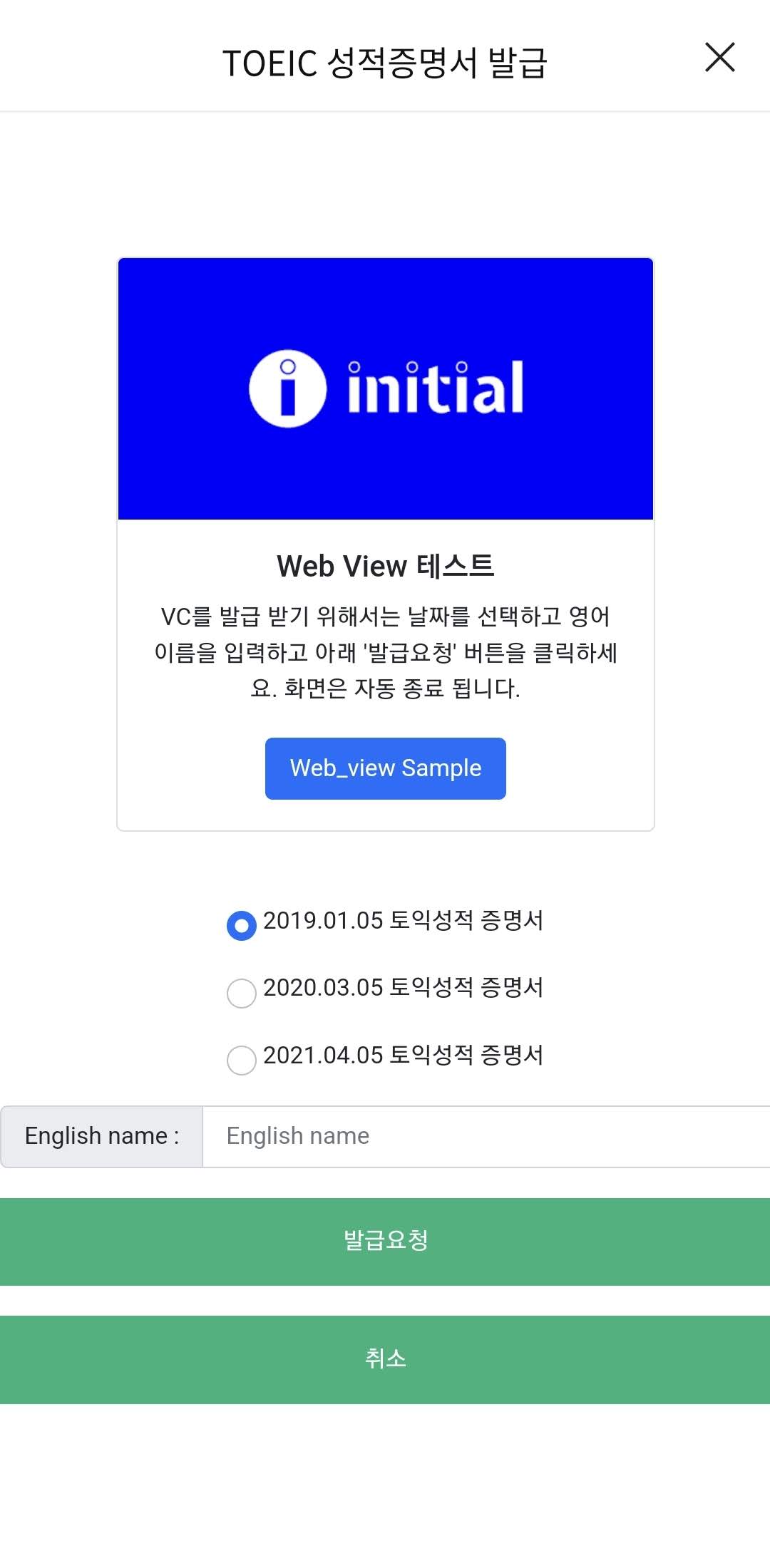
**- Webview 화면 요청 **
- [Previous Condition] : 사용자로 부터 추가 정보 필요할 경우 (발급 증명서 선택, 결제화면 등)
- [Action] : 사용자에게 기관의 Web Page 주소를 Basic Message로 전달하고, 해당 화면을 WebView 실행 요청
- [Development] : 기관(Issuer/Verifier) 서버 → Cloud Agent(플랫폼) API 요청
*** Contents Json Sample ***
Sample 화면
[Option] Web_view내 닫기(취소) 버튼 개발 Guide
- 취소 버튼 Java Script Guide
- web_view의 취소 버튼 삽입 시 아래 java script code를 적용하면, intial App은 전체 진행을 취소.
- sample code : https://github.com/sktston/initial-controller-java/blob/cloud_demo/src/main/resources/static/web-view/form.html
<script>
    function cancle(){
        //initial app에서 web_view 화면을 즉시 종료 하는 code
        var userAgent = navigator.userAgent.toLowerCase();
        if (userAgent.search("android") > -1) {
            Android.failVC ();
        }
        else {
            webkit.messageHandlers.callbackHandler.postMessage("failVC");
        }
    }
</script>
note
initial App은 다음 Request가 수신되면 Web View 화면을 자동 종료 합니다.
[Option] Web_view내 제출 완료 시 Javascript function 개발 Guide
Webview를 통해 사용자 제출이 완료되면, 명시적으로 App으로 해당 정보를 전달해야 한다. 그래야 다음 Action을 진행할 수 있다
complete : function(){
   var userAgent = navigator.userAgent.toLowerCase();
   if (userAgent.search("android") > -1) {
       Android.submitVC ();
   }
   else {
       webkit.messageHandlers.callbackHandler.postMessage("submitVC");
   }
}
[Option] Web_view내 Modal 개발 Guide
- Web view내 API의 동작 처리 시간이 오래 걸리는 경우 Modal등 화면을 이용하여 사용자에게 UI/UX 처리해야 함
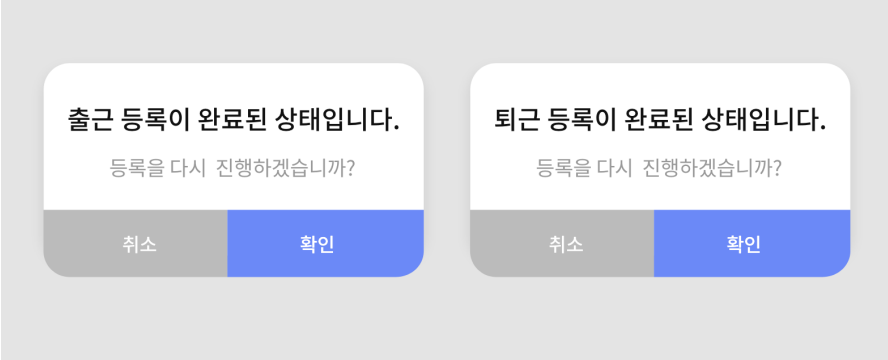
** - Popup 알림창 요청 **
- [Previous Condition] : 기관(Issuer/Verifier) → Holder(initial App 혹은 Cloud Wallet등)에 알림창 표시를 위해 사용한다.
- [Action] : "type":"initial_message_popup" 선언 후 정의된 message 본문 전송
- [Development] : 기관(Issuer/Verifier) 서버 → Cloud Agent(플랫폼) API 요청
*** Contents Json Sample ***
{
  "type":"initial_message_popup",
  "content":{
    "message_code":"{{code}}",
    "message_main":"{{main message}}",
    "message_sub":"{{sub message}}",
    "button":["확인","취소"]
  }
}
*** Contents Attribute List ***
| Field | 필수 | Value | Description |
|---|---|---|---|
| message_code | 필수 | 별도 Spec 참고 | e.g. D0004 = 승인되지 않았음 |
| message_main | 필수 | 사용자 정의 | 화면에 표시하고 싶은 Main Title |
| message_sub | X | 사용자 정의 | 화면에 표시하고 싶은 Sub Title |
| button | X | "확인","종료","취소","재시도" 등 사용자 정의 |
code별 버튼 동작은 아래 spec 참고 Custom 동작은 협의 필요 |
*** Predefined code & message ***
| No | code | message_main | button | button Action | 실패 Action |
|---|---|---|---|---|---|
| 1 | 0000 | 사용자 정의 | "확인" | 종료하고 Main으로 이동 | |
| 2 | 0001 | 사용자 정의 | "재시도" "종료 혹은 취소" |
재시도 : 실패한 동작 재시고 종료 : 종료하고 Main으로 이동 |
|
| 3 | 0002 | 사용자 정의 | "종료"/"취소" | 종료하고 Main으로 이동 | |
| 4 | H0001 | 출근 등록이 정상적으로 완료되었습니다 | |||
| 5 | H0002 | 퇴근 등록이 정상적으로 완료되었습니다 | |||
| 6 | H0003 | 출근 등록이 완료된 상태입니다 | |||
| 7 | H0004 | 퇴근 등록이 완료된 상태입니다 | |||
| 8 | H0005 | 출근 등록이 완료되지 않았습니다 | |||
| 9 | H0006 | 퇴근 등록이 완료되지 않았습니다 | |||
| 10 | M0001 | 로그인이 완료 되었습니다 | 종료하고 Main으로 이동 |
Sample 화면
- Toast 알림창 요청
- [Previous Condition] : 기관(Issuer/Verifier) → Holder(initial App 혹은 Cloud Wallet등)에 Toast 알림창 표시를 위해 사용한다.
- [Action] : "type":"initial_message_toast" 선언 후 정의된 message 본문 전송
- [Development] : 기관(Issuer/Verifier) 서버 → Cloud Agent(플랫폼) API 요청
*** Contents Json Sample ***
{
  "type":"initial_message_toast",
  "content":{
    "message_code":"{{code}}",
    "message_main":"{{main message}}"
  }
}
| Field | 필수 | Value | Description |
|---|---|---|---|
| message_code | 필수 | 별도 Spec 참고 | e.g. D0004 = 승인되지 않았음 |
| message_main | 필수 | 사용자 정의 | 화면에 표시하고 싶은 Main Title |
*** Predefined code & message ***
| No | message_code | message_main | Description | Next Action |
|---|---|---|---|---|
| 1 | 0000 | 성공하였습니다 | 종료하고 Main으로 이동 | |
| 2 | 0001 | 실패하였습니다 | 종료하고 Main으로 이동 | |
| 3 | M0001 | {{ 사용자 Message }} | 종료하고 Main으로 이동 |
**- 문서 제출 완료 수신 **
- [Previous Condition] : Holder(initial App 혹은 Cloud Wallet등) → 기관(Issuer/Verifier)에 문서제출 완료를 수신하기 위해 사용한다.
- [Action] : "type":"initial_summit_doc" 선언 후 정의된 message 본문 전송
- [Development] : 기관(Issuer/Verifier) 서버 → Cloud Agent(플랫폼) API 요청
*** Contents Json Sample ***
{
  "type":"initial_summit_doc",
  "content":
    {
        "seq":"1038555586867",
        "govDocs":{
            "bundleId":"999388811455",
            "reqDocId":[
                "10000000001"
            ],
            "pinCode":"099998",
            "walletAddr":"1DF34115DA312141",
            "masking":"Y",
            "verify":"Y"
        },
        "ocrDocs":[
            {
                "seq":"1038555586867",
                "reqDocId":"10000000001",
                "docId":"90000000011",
                "fileName":"1038555586867_10000000001_189057378234.tiff",
                "masking":"Y",
                "verify":"Y",
                "ocrInfo":{
                    "name":"홍길동",
                    "idNo":"111111-1",
                    "issueDate":"20201117",
                    "authority":"서울특별시 중구청장"
                }
            },
            {
                "seq":"1038555586867",
                "reqDocId":"10000000001",
                "docId":"90000000022",
                "fileName":"1038555586867_10000000001_189057378235.tiff",
                "masking":"Y",
                "verify":"Y",
                "ocrInfo":{
                    "name":"홍길동",
                    "idNo":"111111-1",
                    "issueDate":"20201117",
                    "authority":"서울특별시 중구청장"
                }
            }
        ],
        "etcDocs":[
            {
                "seq":"1038555586867",
                "reqDocId":"10000000001",
                "masking":"N",
                "verify":"Y",
                "fileName":"1038555586867_10000000001_189057378245.jpeg",
                "docId":"90000000011"
            },
            {
                "seq":"1038555586867",
                "reqDocId":"10000000001",
                "docId":"90000000012",
                "masking":"N",
                "verify":"Y",
                "fileName":"1038555586867_10000000001_189057378255.jpeg",
            }
        ]

    }
}
기관이 받는 message sample
{

   "connection_id":"9ac517e7-4381-44ba-8890-d2feacb484df",

   "message_id":"64635b43-cc6b-4dc0-a8ce-40cad4c5cd27",

   "content":"{\"type\":\"initial_summit_doc\",\"content\":{\"seq\":\"1038555586867\",\"reqDocId\":\"10000000001\",\"docId\":\"90000000011\",\"govDocs\":{\"bundleId\":\"999388811455\",\"reqDocId\":[10000000001],\"pinCode\":\"099998\",\"walletAddr\":\"1DF34115DA312141\",\"masking\":\"Y\",\"verify\":\"Y\"},\"ocrDocs\":[{\"seq\":\"1038555586867\",\"reqDocId\":\"10000000001\",\"docId\":\"90000000011\",\"fileName\":\"1038555586867_10000000001_189057378234.tiff\",\"masking\":\"Y\",\"verify\":\"Y\",\"ocrInfo\":{\"name\":\"\ud64d\uae38\ub3d9\",\"idNo\":\"111111-1\",\"issueDate\":\"20201117\",\"authority\":\"\uc11c\uc6b8\ud2b9\ubcc4\uc2dc \uc911\uad6c\uccad\uc7a5\"}},{\"seq\":\"1038555586867\",\"reqDocId\":\"10000000001\",\"docId\":\"90000000022\",\"fileName\":\"1038555586867_10000000001_189057378235.tiff\",\"masking\":\"Y\",\"verify\":\"Y\",\"ocrInfo\":{\"name\":\"\ud64d\uae38\ub3d9\",\"idNo\":\"111111-1\",\"issueDate\":\"20201117\",\"authority\":\"\uc11c\uc6b8\ud2b9\ubcc4\uc2dc \uc911\uad6c\uccad\uc7a5\"}}],\"etcDocs\":[{\"seq\":\"1038555586867\",\"reqDocId\":\"10000000001\",\"masking\":\"N\",\"verify\":\"Y\",\"fileName\":\"1038555586867_10000000001_189057378245.jpeg\",\"docId\":\"90000000011\"},{\"seq\":\"1038555586867\",\"reqDocId\":\"10000000001\",\"docId\":\"90000000012\",\"masking\":\"N\",\"verify\":\"Y\",\"fileName\":\"1038555586867_10000000001_189057378255.jpeg\"}]}}",

   "state":"received",

   "sent_time":"2021-11-05 02:09:02.602966Z"

}
** - 서버 메시지 수신 **
- [Previous Condition] : Holder(initial App 혹은 Cloud Wallet등) → 기관(Issuer/Verifier)에 메시지 전달 위해 사용한다.
- [Action] : "type":"initial_message_server" 선언 후 정의된 message 본문 전송
- [Development] : 기관(Issuer/Verifier) 서버 → Cloud Agent(플랫폼) API 요청
*** Predefined code & message ***
| No | message_code | message_main | message_sub | Description | Next Action |
|---|---|---|---|---|---|
| 1 | H0001 | 사용자 이름 | 사용자 전화 번호 | 노인인력개발원 전용 | |
| 2 | H0002 | 사용자 이름 | 사용자 전화 번호 | 노인인력개발원 전용 |
*** Contents Json Sample ***